ConfigMap
1、什么是configmap
Configmap是k8s中的资源对象,用于保存非机密性的配置的,数据可以用key/value键值对的形式保存,也可通过文件的形式保存。
2、configmap能解决哪些问题
我们在部署服务的时候,每个服务都有自己的配置文件,如果一台服务器上部署多个服务:nginx、tomcat、apache等,那么这些配置都存在这个节点上,假如一台服务器不能满足线上高并发的要求,需要对服务器扩容,扩容之后的服务器还是需要部署多个服务:nginx、tomcat、apache,新增加的服务器上还是要管理这些服务的配置,如果有一个服务出现问题,需要修改配置文件,每台物理节点上的配置都需要修改,这种方式肯定满足不了线上大批量的配置变更要求。 所以,k8s中引入了Configmap资源对象,可以当成volume挂载到pod中,实现统一的配置管理。
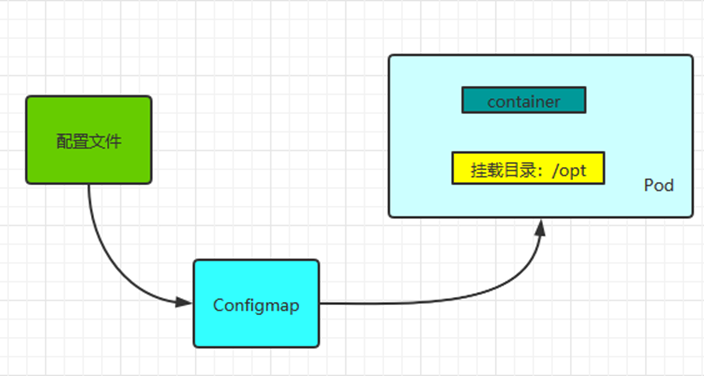
1、Configmap是k8s中的资源, 相当于配置文件,可以有一个或者多个Configmap;
2、Configmap可以做成Volume,k8s pod启动之后,通过 volume 形式映射到容器内部指定目录上;
3、容器中应用程序按照原有方式读取容器特定目录上的配置文件。
4、在容器看来,配置文件就像是打包在容器内部特定目录,整个过程对应用没有任何侵入。
3、应用场景
1、使用k8s部署应用,当你将应用配置写进代码中,更新配置时也需要打包镜像,configmap可以将配置信息和docker镜像解耦,以便实现镜像的可移植性和可复用性,因为一个configMap其实就是一系列配置信息的集合,可直接注入到Pod中给容器使用。configmap注入方式有两种,一种将configMap做为存储卷,一种是将configMap通过env中configMapKeyRef注入到容器中。
2、使用微服务架构的话,存在多个服务共用配置的情况,如果每个服务中单独一份配置的话,那么更新配置就很麻烦,使用configmap可以友好的进行配置共享。
4、局限性
ConfigMap在设计上不是用来保存大量数据的。在ConfigMap中保存的数据不可超过1 MiB。如果你需要保存超出此尺寸限制的数据,可以考虑挂载存储卷或者使用独立的数据库或者文件服务。
5、Configmap创建方法
1、命令行直接创建
直接在命令行中指定configmap参数创建,通过–from-literal指定参数
1
2
3
4
5
6
7
8
9
10
11
12
13
14
15
16
17
18
19
20
| [root@master1 ~]
configmap/tomcat-config created
[root@master1 ~]
Name: tomcat-config
Namespace: default
Labels: <none>
Annotations: <none>
Data
====
server_name:
----
myapp.tomcat.com
tomcat_port:
----
8080
Events: <none>
|
2、通过文件的方式创建
当用–from-file不指定key的名字时,会使用nginx.conf作为key值
1
2
3
4
5
6
7
8
9
10
11
12
13
14
15
16
17
18
19
20
21
22
23
24
25
26
27
28
29
30
|
[root@master1 configmap]
server {
server_name www.nginx.com;
listen 80;
root /home/nginx/www/
}
[root@master1 configmap]
configmap/www-nginx-conf created
[root@master1 ~]
Name: www-nginx-conf
Namespace: default
Labels: <none>
Annotations: <none>
Data
====
www:
----
server {
server_name www.nginx.com;
listen 80;
root /home/nginx/www/
}
Events: <none>
|
3、指定目录创建
1
2
3
4
5
6
7
8
9
10
11
12
13
14
15
16
17
18
19
20
21
22
23
24
25
26
27
28
29
| [root@master1 configmap]
[root@master1 configmap]
[root@master1 test]
server-id=1
[root@master1 test]
server-id=2
[root@master1 ~]
configmap/mysql-config created
[root@master1 ~]
Name: mysql-config
Namespace: default
Labels: <none>
Annotations: <none>
Data
====
my-server.cnf:
----
server-id=1
my-slave.cnf:
----
server-id=2
Events: <none>
|
4、通过yaml文件创建configmap
1
2
3
4
5
6
7
8
9
10
11
12
13
14
15
16
17
18
19
20
21
22
23
24
25
26
27
28
29
30
31
32
33
34
35
36
37
38
39
40
41
| [root@master1 configmap]
apiVersion: v1
kind: ConfigMap
metadata:
name: mysql
labels:
app: mysql
data:
master.cnf: |
[mysqld]
log-bin
log_bin_trust_function_creators=1
lower_case_table_names=1
slave.cnf: |
[mysql]
super-read-only
log_bin_trust_function_creators=1
[root@master1 configmap]
Name: mysql
Namespace: default
Labels: app=mysql
Annotations: <none>
Data
====
master.cnf:
----
[mysqld]
log-bin
log_bin_trust_function_creators=1
lower_case_table_names=1
slave.cnf:
----
[mysql]
super-read-only
log_bin_trust_function_creators=1
Events: <none>
|
6、使用Configmap的方法
1、ConfigMapKeyRef
1
2
3
4
5
6
7
8
9
10
11
12
13
14
15
16
17
18
19
20
21
22
23
24
25
26
27
28
29
30
31
32
33
34
| [root@master1 configmap]
apiVersion: v1
kind: Pod
metadata:
name: mysql-pod
spec:
containers:
- name: mysql
image: busybox
command: ["/bin/sh","-c","sleep 3600"]
env:
- name: log_bin
valueFrom:
configMapKeyRef:
name: mysql
key: master.cnf
- name: lower
valueFrom:
configMapKeyRef:
name: mysql
key: slave.cnf
restartPolicy: Never
[root@master1 configmap]
/
log_bin=[mysqld]
log-bin
log_bin_trust_function_creators=1
lower_case_table_names=1
lower=[mysql]
super-read-only
log_bin_trust_function_creators=1
|
2、envfrom,通过环境变量的引入
1
2
3
4
5
6
7
8
9
10
11
12
13
14
15
16
17
18
19
20
21
22
23
24
25
26
27
| [root@master1 configmap]
apiVersion: v1
kind: Pod
metadata:
name: mysql-pod-envfrom
spec:
containers:
- name: mysql
image: busybox
imagePullPolicy: IfNotPresent
command: ["/bin/sh","-c","sleep 3600"]
envFrom:
- configMapRef:
name: mysql
restartPolicy: Never
[root@master1 configmap]
/
slave.cnf=[mysql]
super-read-only
log_bin_trust_function_creators=1
master.cnf=[mysqld]
log-bin
log_bin_trust_function_creators=1
lower_case_table_names=1
|
3、把configmap做成volume,挂载到pod(最常用的方式)
1
2
3
4
5
6
7
8
9
10
11
12
13
14
15
16
17
18
19
20
21
22
23
24
25
26
27
28
29
30
31
32
| [root@master1 configmap]
apiVersion: v1
kind: Pod
metadata:
name: mysql-pod-volume
spec:
containers:
- name: mysql
image: busybox
command: ["/bin/sh","-c","sleep 3600"]
volumeMounts:
- name: mysql-config
mountPath: /tmp/config
volumes:
- name: mysql-config
configMap:
name: mysql
restartPolicy: Never
[root@master1 configmap]
/
/tmp/config
master.cnf slave.cnf
/tmp/config
[mysqld]
log-bin
log_bin_trust_function_creators=1
lower_case_table_names=1
[mysql]
super-read-only
log_bin_trust_function_creators=1
|
7、configmap的热更新
通过edit直接修改的方式(修改完成后pod会自动进行更新)
注意:通过环境变量方式给pod赋值的,修改configmap的配置也不会再其pod内生效
1
2
3
4
5
6
7
8
9
10
11
12
13
14
| [root@master1 configmap]
apiVersion: v1
data:
log: "2"
[root@master1 configmap]
/
/tmp/config
log master.cnf slave.cnf
/tmp/config
2/tmp/config
|
Secret
1、secret概述
Configmap一般是用来存放明文数据的,如配置文件,对于一些敏感数据,如密码、私钥等数据时,要用secret类型。
Secret解决了密码、token、秘钥等敏感数据的配置问题,而不需要把这些敏感数据暴露到镜像或者Pod Spec中。Secret可以以Volume或者环境变量的方式使用。
要使用 secret,pod 需要引用 secret。Pod 可以用两种方式使用 secret:作为 volume 中的文件被挂载到 pod 中的一个或者多个容器里,或者当 kubelet 为 pod 拉取镜像时使用。
2、可选参数
generic: 通用类型,通常用于存储密码数据。
tls:此类型仅用于存储私钥和证书。
docker-registry: 若要保存docker仓库的认证信息的话,就必须使用此种类型来创建。
3、类型
Service Account:用于被 serviceaccount 引用。serviceaccout 创建时 Kubernetes 会默认创建对应的 secret。Pod 如果使用了 serviceaccount,对应的 secret 会自动挂载到 Pod 的 /run/secrets/kubernetes.io/serviceaccount 目录中。
Opaque:base64编码格式的Secret,用来存储密码、秘钥等。可以通过base64 –decode解码获得原始数据,因此安全性弱
kubernetes.io/dockerconfigjson:用来存储私有docker registry的认证信息
4、使用
1、通过环境变量引入Secret
1
2
3
4
5
6
7
8
9
10
11
12
13
14
15
16
17
18
19
20
21
22
23
24
25
26
27
28
29
30
31
32
33
|
[root@master1 secret]
secret/mysql-password created
[root@master1 secret]
apiVersion: v1
kind: Pod
metadata:
name: pod-secret
labels:
app: myapp
spec:
containers:
- name: myapp
image: ikubernetes/myapp:v1
ports:
- name: http
containerPort: 80
env:
- name: MYSQL_ROOT_PASSWORD
valueFrom:
secretKeyRef:
name: mysql-password
key: password
imagePullPolicy: IfNotPresent
[root@master1 secret]
/
MYSQL_ROOT_PASSWORD=qwer1234
|
2、编写配置文件生成secret
1
2
3
4
5
6
7
8
9
10
11
12
13
14
15
16
17
18
19
20
21
22
23
24
25
26
27
28
29
30
31
32
33
34
35
36
37
38
39
| [root@master1 secret]
apiVersion: v1
kind: Secret
metadata:
name: mysecret
type: Opaque
data:
username: YWRtaW0K
password: YWRtaW0xMjM0NTYK
[root@master1 secret]
apiVersion: v1
kind: Pod
metadata:
name: pod-secret-volume
labels:
app: myapp
spec:
containers:
- name: myapp
image: ikubernetes/myapp:v1
volumeMounts:
- name: secret-volume
mountPath: /etc/secret
readOnly: true
volumes:
- name: secret-volume
secret:
secretName: mysecret
[root@master1 secret]
/
/etc/secret
password username
/etc/secret
admim123456
admim
|